
What is MCP (Model Context Protocol) and Why it Matters
Introduction
Over the past few years, Large Language Models (LLMs) have evolved at a remarkable pace, but one thing has remained constant: on their own, they can’t actually do anything. An LLM can generate text, reason about a prompt, or summarize information, but it cannot send an email, update a database, schedule an appointment, or interact with the real world without help. Early versions of ChatGPT made this limitation obvious, the model was powerful, but ultimately confined to text.
Developers tried to solve this by connecting LLMs to external tools and APIs. This worked, but only up to a point. Each tool had its own format, its own authentication, its own quirks. As systems grew more complex, maintaining dozens of integrations became messy and fragile.
This is exactly the problem that MCP (Model Context Protocol) was designed to solve. MCP provides a universal, standardized way for LLMs to communicate with tools, services, and data sources — turning disconnected integrations into a clean, unified ecosystem. It’s the layer that finally allows LLMs to move from “predictive text engines” to reliable, action-capable assistants.
The Problem: LLMs Can’t Act on Their Own
Despite their impressive capabilities, LLMs on their own cannot perform meaningful actions. They can generate text, complete sentences, answer questions, and even reason about a prompt — but they cannot do anything in the real world. Early versions of ChatGPT made this clear. If you asked the model to send an email, retrieve a file, update a spreadsheet, or schedule an appointment, it simply couldn’t. It would reply, “I’m unable to perform that action.”
This is because an LLM is fundamentally a next-word prediction engine. When you say, “My Big Fat Greek…,” it predicts that the next word is “Wedding” based on statistical patterns in its training data. This is powerful in language tasks but completely insufficient when you need an AI system to interact with APIs, databases, tools, or workflows. In short, LLMs have intelligence — but no agency.This gap between understanding and action created the first major limitation in AI-powered workflows.
LLM + Tools: Helpful but Messy
To overcome this limitation, developers began connecting LLMs to external tools and APIs. With the right setup, an LLM could suddenly search the web, send an email, log data into a spreadsheet, or interact with a CRM. Platforms like Zapier, n8n, and custom-built workflows made this possible.
This approach extended the LLM’s capabilities dramatically — but came with its own problems.
Every tool:
- has a different API format,
- requires different authentication,
- expects different inputs,
- returns inconsistent outputs,
- and breaks easily when scaled.
If you want an assistant that can search the internet, read emails, summarize them, check a database, and send a notification… you end up stitching together multiple tools. Keeping them stable, synchronized, and error-free becomes a challenge. As someone working at an AI startup, this is a daily reality — just building a simple search function requires choosing a provider, reading API docs, writing glue code, and praying the model doesn’t hallucinate a wrong request.LLMs became more capable — but the ecosystem around them became increasingly fragile.
We needed a unified way to connect tools that didn’t rely on dozens of custom integrations.
What Is MCP and How It Works
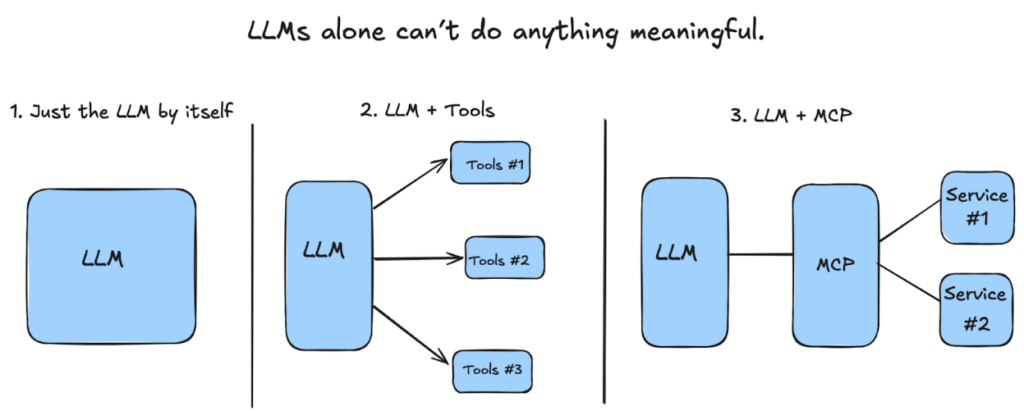
This is where MCP (Model Context Protocol) enters the picture. MCP introduces a universal, standardized way for LLMs to communicate with external systems — databases, APIs, code repositories, files, or any other tool.
Instead of manually wiring each tool with custom logic, MCP acts as a single interface layer.
Think of it as a universal translator:
- Tool #1 speaks English
- Tool #2 speaks Spanish
- Tool #3 speaks Japanese
- MCP converts all of them into one consistent language the LLM understands
With MCP, every tool describes itself in a standard format:
what actions it can perform, what inputs it needs, and what outputs it provides.
This allows the LLM to:
- Discover available tools
- Understand how to use them
- Call the appropriate tool for the task
- Receive structured, predictable results
- Continue reasoning with that context
- Produce an accurate final output
Your workflow diagram (LLM → MCP → Tools → Output) fits perfectly here.
In practice, this means:
- No more custom wrappers
- No more broken glue code
- No more API chaos
- No more hallucinated tool calls
- Much easier scaling across multiple systems
MCP finally gives LLMs a clean, reliable, developer-friendly way to interact with the real world.
MCP in the Real World: What Developers Are Already Building
Example: Searching the Web While Coding
Instead of manually wiring a search API into your coding environment, MCP allows the LLM to request internet search results through a standardized protocol. No custom integration, no special wrappers — just a single interface that works everywhere.
Example: Managing Notion With Your Voice
Voice commands pass through the LLM, which uses MCP to call Notion’s APIs. Because MCP normalizes every tool, the developer doesn’t need to build complex bridges or custom routes.
Example: Comparing Doctor Reviews Automatically
Instead of writing multiple scripts to scrape, analyze, and summarize data, MCP coordinates every step through a single protocol, making multi-tool workflows far easier to maintain.
Conclusion
MCP brings order to the chaos of tool integrations. By standardizing how AI connects to external systems, it replaces fragile, ad-hoc wiring with a clean, unified protocol. As AI agents become more capable, MCP becomes the foundation that makes them scalable, reliable, and ready for real-world use.